Gratitude Day 23: Dithering (Floyd and Steinberg, take a bow!)
Wed 23 September 2026
Background / Basic Concepts
Another entry in the "Things that old folks care about but young folks don't know much about" department, let's talk about dithering!
Dithering was how you got your 8/16-bit computers to look like they had more colors (or shades of gray) onscreen than they could really produce. It was even used in chiptunes, to make a single-voice PC speaker sound like it actually had four or more voices by quickly switching between the different parts of the tune, sort of like PWM, if you're familiar with that.
On a high-level, "dithering" just means quickly jumping back and forth between discrete values, giving the impression of a values in-between the two. For example, if you wanted to produce a graphic sort of like this:
________░░░░░░░░▒▒▒▒▒▒▒▒▓▓▓▓▓▓▓▓████████
but the only values you have at your disposal are "_" and "█," then you could do something like this:
________█_______█___█___█_█_█_█_████████
Comparing the two, you can see the vague similarity:
________░░░░░░░░▒▒▒▒▒▒▒▒▓▓▓▓▓▓▓▓████████
________█_______█___█___█_█_█_█_████████
That's the basic idea.
Thresholding
The most conceptually simple dither isn't a dither at all, but a 50% threshold. In high-level pseudocode it looks something like this:
for pixel in image
do
    if pixel.to_grayscale() >= 128
    then
        newpixel=255
    else
        newpixel=0
    fi
    newimage.append(newpixel)
If you remember what Xeroxes (photocopies) of photos looked like before the advent of digital copiers, the end result will look familiar to you, and it's not great. 😄
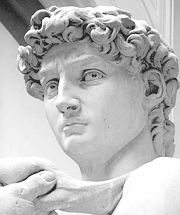

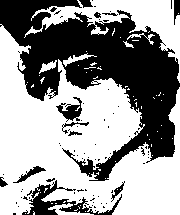
Randomness dither
In my opinion, the next most conceptually simple method of dithering is the random or randomness dither. In pseudocode, it looks like this:
for pixel in image
do
    if pixel.to_grayscale() >= random(0,255)
    then
        newpixel=255
    else
        newpixel=0
    fi
    newimage.append(newpixel)
It yields an image that looks a little more like the original, but is kind of noisy:
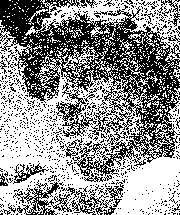
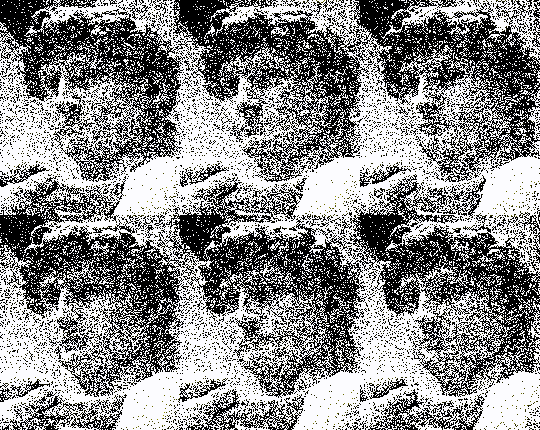
However, the randomness dither does somewhat emulate the way that "the real world" (a.k.a. quantum physics?) accomplishes dithering, so if used in a quickly-moving animation, it almost looks plausible:
Ordered / Bayer dither
This is probably the dithering algorithm that people are most familiar with, as it's still used in "retro" graphics and games today. It is a nice middle ground between algorithms, because it is most recognizable as a dither, but it also somewhat effective at representing the source image.
Now the matrix math involved in the Bayer algorithm quickly rises above my pay grade, but a very simple 2x2 bayer matrix algorithm would look something like this:
for x in ( 0 to image.size_x() / 2, step 2 )
do
    for y in ( 0 to image.size_y() / 2, step 2 )
    do
        if image.pixel(x,y).to_grayscale() >= 64
            then newimage.assign(x,y)=255
                else newimage.assign(x,y)=0
        fi
        if image.pixel(x+1,y).to_grayscale() >= 64
            then newimage.assign(x+1,y)=255
                else newimage.assign(x+1,y)=0
        fi
        if image.pixel(x,y+1).to_grayscale() >= 64
            then newimage.assign(x,y+1)=255
                else newimage.assign(x,y+1)=0
        fi
        if image.pixel(x+1,y+1).to_grayscale() >= 64
            then newimage.assign(x+1,y+1)=255
                else newimage.assign(x+1,y+1)=0
        fi
    done
done
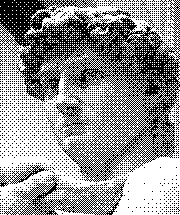
(Note that the example image is using an 4x4 bayer dither, not the simple 2x2 algorithm I described in the pseudocode)
Floyd-Steinberg
Floyd-Steinberg and its derivatives is the one I remember seeing the most in the early 90s, because it really does an amazing job of preserving both detail and faking shades of gray (or colors) that your system wasn't able to display. I don't see it too much anymore because it's honestly a little too good for most purposes people use dithering for today (an aesthetic retro vibe).
I won't try to explain the algorithm, because I honestly don't remember it well, but I do recall going through Wikipedia's pseudocode for it some years back and producing my own FS dithering program in Processing, so it can't be that hard. 😄
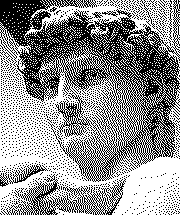
(Attribution: the above images were source from the Wikipedia articles on Dithering and Floyd-Steinberg linked in the body of this post, with the exception of the random dither animation, which was generated from the Wikipedia grayscale original using didder and ffmpeg)
Back to index
Category: Tech
Tags:
Computing
Gaming
Monthly themes
Non-religious post
Retrocomputing